View all connectors
Sourcegraph Amp
By integrating Sourcegraph Amp with DX, you can import Amp workspace members, recent conversation threads, per-thread model usage, and daily usage analytics, then link them with the rest of your DX data. Refer to the API list below and the schema explorer to see what DX imports.
Prerequisites
To connect Sourcegraph Amp to DX, you need:
- an Amp Enterprise workspace
- OAuth2 client credentials (client_id and client_secret)
- OAuth scopes to read workspace analytics, members and thread metadata
- (optional) allowlist DX IP addresses if your Amp instance is behind a firewall or has IP restrictions
Setup instructions
Follow the steps below to connect Sourcegraph Amp to DX.
Step 1
Create OAuth2 Client Credentials in your Amp organization (Auth service).
- Go to “External API Applications” section in your Amp workspace settings, and create a new OAuth2 client with the following scopes:
amp.api:workspace.analytics:viewamp.api:workspace.members:viewamp.api:workspace.threads.meta:viewamp.api:workspace.threads.contents:view
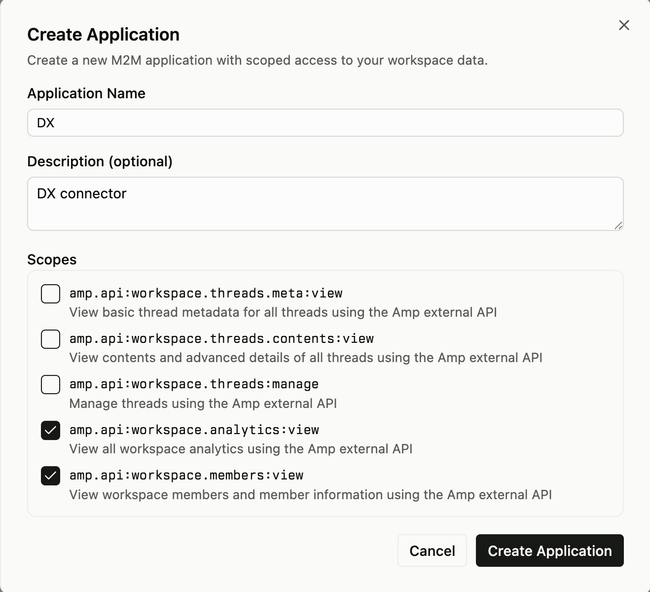
- Copy the
client_idandclient_secret.

Step 2
- In DX, go to Connections and select “+ Connection”.
- Choose “Sourcegraph Amp” as the connector type.
- Enter the
client_idandclient_secretcreated in Step 1. - If your Amp instance requires requests from a fixed IP, enable “Use static IP” for this connection in DX and allowlist DX’s egress IP on your side.
API reference
DX calls the following Amp API endpoints.
| Endpoint | Documentation |
|---|---|
| POST https://auth.ampcode.com/oauth2/token | client_credentials token exchange |
| GET https://ampcode.com/api/v2/workspace/analytics/daily-usage | OpenAPI |
| GET https://ampcode.com/api/v2/workspace/members | OpenAPI |
| GET https://ampcode.com/api/v2/threads | OpenAPI |
| GET https://ampcode.com/api/v2/threads/{threadID}/usage | OpenAPI |
Notes:
- Base URL:
https://ampcode.com - Authentication:
Authorization: Bearer <access_token>obtained via OAuth2 Client Credentials Flow athttps://auth.ampcode.com/oauth2/token.
Errors
The table below lists potential error codes when adding a connection in DX.
| Error | Description |
|---|---|
invalid_credentials |
Your client_id or client_secret is invalid. |
invalid_permissions |
The OAuth client lacks required scopes to read analytics. |
no_resources |
DX cannot access any Amp workspaces or data. |