View all connectors
Coralogix
By integrating Coralogix with DX, you can import data on Coralogix usage and link this data to the rest of your DX data to analyze impact. Please refer to the API documentation below and our schema explorer to see what data DX imports—note that DX does not read or access your source code.
Prerequisites
To connect Coralogix to DX, you need:
- an API key
- region of the coralogix account
Setup instructions
Follow the steps below to connect Coralogix to DX.
Step 1
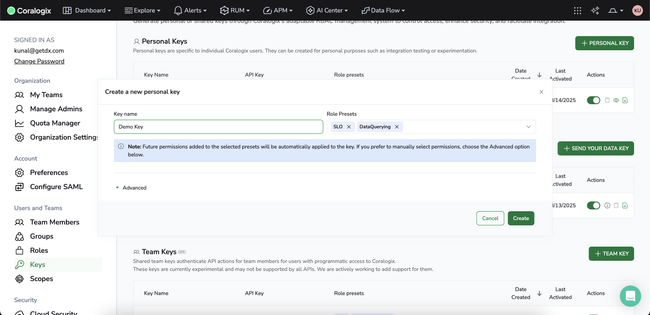
- Navigate to Profile > Settings > Users and Teams > Keys from the Coralogix dashboard.
- Create either a Personal Key or Team Key with
SLOandDataQueryingrole presets.

Step 2
- To find out the region of your Coralogix account, look at the base URL of your account. It should be in the format
team_name.<region>.coralogix.com. - Example:
https://dev-team.app.cx498.coralogix.com/. Here the region is:cx498
Step 3
- Navigate to the connections page in DX and select “+ Connection” in the top right.
- Enter the credentials you have generated in the previous steps—refer to the information below for errors and troubleshooting.
API reference
The table below lists the specific API endpoints that are used by DX.
| Endpoint | Documentation |
|---|---|
| GET /mgmt/openapi/5/slo/slos/v1 | Link |
| GET /metrics/api/v1/query_range | Link |
Errors
The table below lists potential error codes when adding a connection in DX.
| Error | Description |
|---|---|
invalid_credentials |
Your API credentials entered are not valid. |
no_resources |
DX cannot access any projects or repositories. |